 Design Duniya
News / WhatsApp
WhatsApp drops the words from its iPhone tab bar
WhatsApp is testing an iPhone tab bar with no words in it. In the latest beta, the five tabs at the bottom of the screen are shown as icons only, and the bar shrinks to match.
By DD Desk
27 Nov 2026 · 2 min read
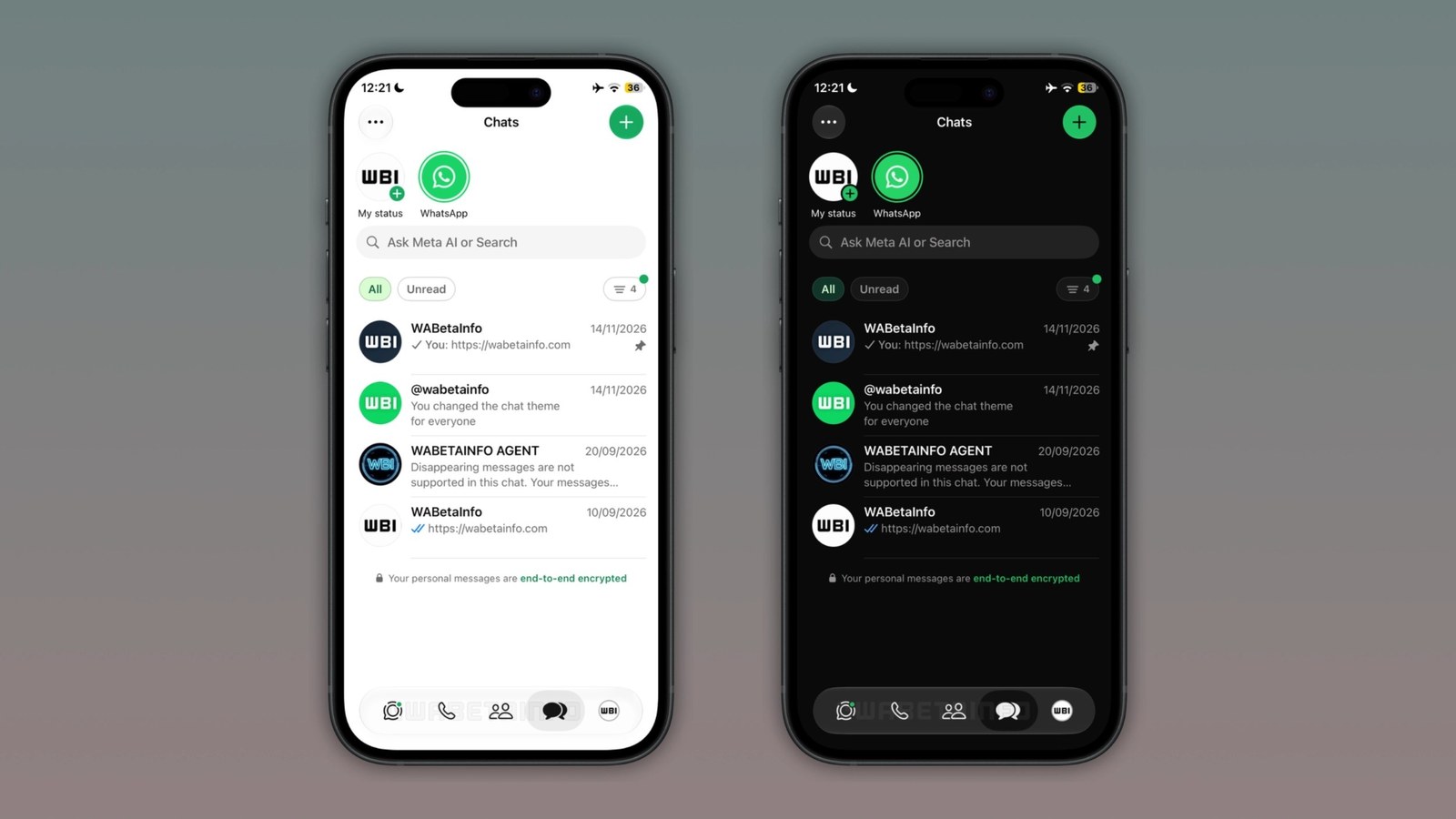
WABetaInfo spotted the change in WhatsApp beta for iOS 26.46.10.71 on TestFlight on 27 November. It is reaching some beta testers first and will spread to more over the coming weeks.
Icons only
The tab bar keeps its five icons: Updates, Calls, Contacts, Chats and You. The text under each one is gone. Labels push the icons up to make room for words below them, so taking them out lets the whole bar sit lower and take less height, giving the chat list a little more of the screen.
Closer to Android
WhatsApp already removed the labels on Android, where a recent redesign made the bottom bar float above the screen and shrink to a small pill as you scroll. The iPhone version is a smaller step: it keeps the translucent “Liquid Glass” bar that arrived with iOS 26 and simply drops the text.
The trade-off is familiar. Icons alone look calmer, but they only work when every icon is obvious. A phone handset for Calls and a speech bubble for Chats are safe bets; the Updates and Contacts icons will be the test for new users.

What changed
WhatsApp’s iPhone beta removes the text labels from the bottom tab bar, leaving icons for Updates, Calls, Contacts, Chats and You.
Why it works
- A shorter bar gives chats more of the screen.
- iPhone and Android now look alike, which helps people who switch.
- It only works because the icons are already well known.
Source
From WABetaInfo (27 Nov 2026), WhatsApp beta for iOS 26.46.10.71. Images from WABetaInfo.